
You mark a word as familiar, only for it to appear again a few cards later. Another word has been absent for days, yet the app still seems happy to leave it alone.
These two decisions answer different questions: How much practice is enough for today, and how long should you wait before reviewing again?
From Ebbinghaus’s experiments to the FSRS algorithm used in Anki and the vocabulary workflow in LearnBit, review schedules have evolved around these questions. Understanding them helps explain why some words keep coming back, why different words have different intervals, and what actually changes each time you report that you know a word.
What Ebbinghaus taught us
In 1885, the German psychologist Hermann Ebbinghaus published his research on memory. Using himself as the subject, he learned strings of nonsense syllables, then returned to them after different delays to see how his memory had changed.
His approach was ingenious: he looked not only at what he could still recall, but also at how much effort he saved when learning the material again.
Suppose a set of material takes 10 minutes to learn the first time and only 6 minutes to relearn later. That represents a 40% saving in learning time. This measure, known as savings, was central to the classic forgetting curve. It does not mean that you can still answer 40% of the questions correctly.
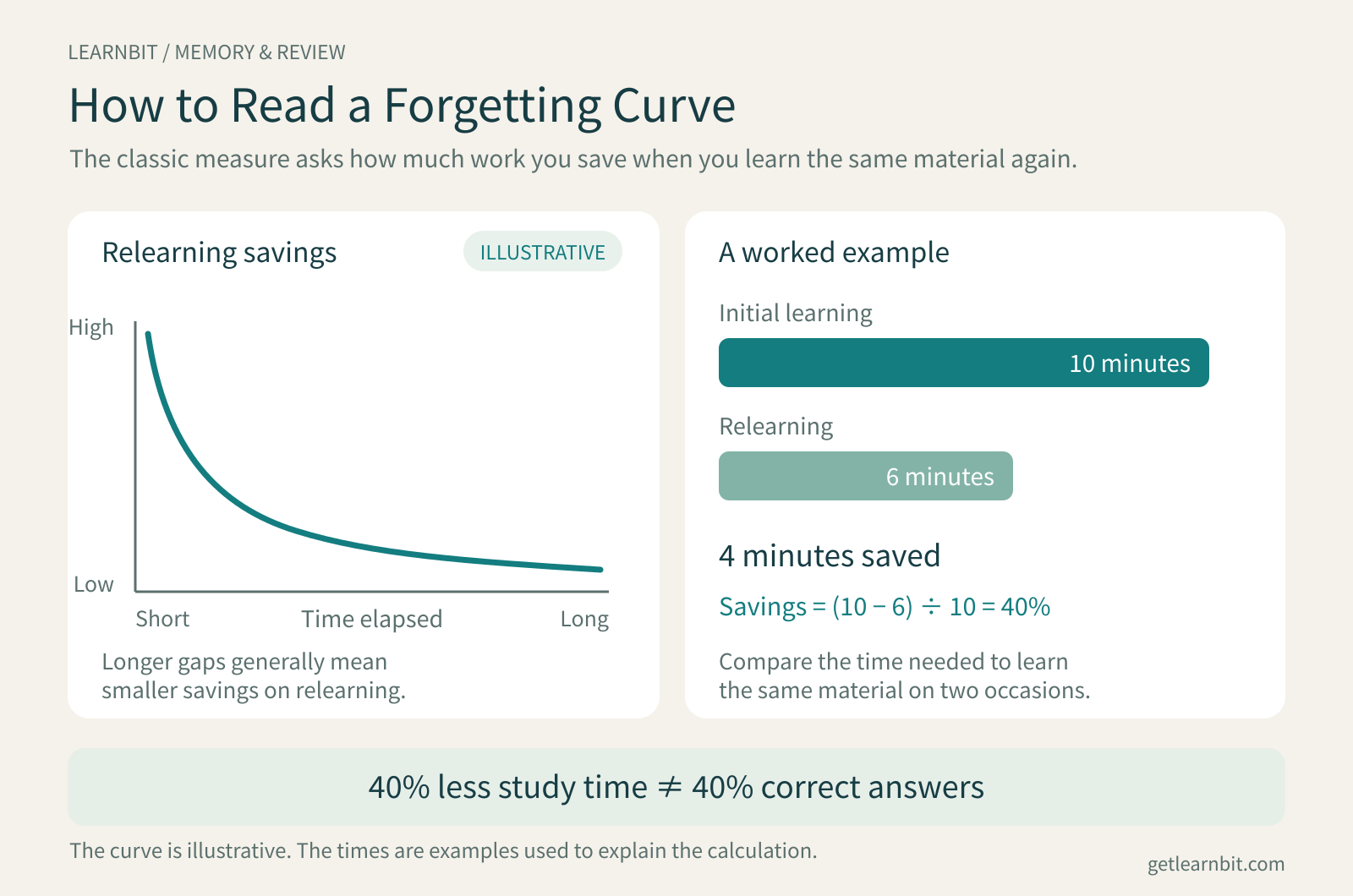
This research helped establish that memory changes over time: forgetting is often faster at first, then slows. A replication published in 2015 found a broadly similar pattern to the original experiments.1
But one person’s results with nonsense syllables cannot simply become everyone’s study timetable. After the same one-day delay, a familiar word and a word you have just encountered may be very different challenges.
That leaves vocabulary apps with a more specific question: When should you review this particular word?
From boxes of cards to models of memory
The Leitner system offers an easy way to understand spaced repetition. Cards go into different boxes. A correct answer moves a card to a box reviewed less often; a forgotten card returns to a box that gets more attention. You can do all of this with paper flashcards.
Computers made it possible to adjust the schedule for each card. SM-2 maintains an “easiness factor” and uses your answers to change future intervals. It already distinguishes between cards instead of giving every word the same timetable.2
Other approaches began estimating memory more directly. Half-life regression, or HLR, developed by researchers at Duolingo, is one example of a model that uses learning records to predict recall.3
| Method | How it schedules reviews |
|---|---|
| Leitner system | Uses the card’s box to determine review frequency |
| SM-2 | Updates an easiness factor from your answers, then adjusts the interval |
| Half-life regression (HLR) | Uses learning records to estimate how quickly memory fades |
| FSRS | Updates the estimated memory state, then calculates an interval using a target retention rate |
They all face the same trade-off. Review too often, and familiar words take up time. Wait too long, and you face more relearning.
How FSRS relates to Anki
FSRS stands for Free Spaced Repetition Scheduler, an open-source algorithm for scheduling spaced repetition. Anki is a learning application; FSRS is one of the scheduling algorithms it can use. Anki integrated FSRS in version 23.10, released in 2023.4
Three quantities help make sense of FSRS:
Difficulty (D): how difficult it is for you to form a lasting memory of the word.
Stability (S): how durable that memory is.
Retrievability (R): the probability that you can recall the word now, given the time since your last review.
In FSRS-6, the model used by LearnBit, stability is the number of days it takes for the predicted probability of recall to fall to 90%. After each response, the model uses the previous memory state, your rating, and the elapsed time to update its estimate for that word.5
Different words can therefore follow different schedules. The schedule for the same word can also change as your performance changes.
Another important setting is desired retention. A target of 90%, for example, means scheduling the next review for a point when the model predicts a 90% chance of successful recall. Raising that target generally means reviewing more often. It is a way to balance recall with the time you spend studying.6
Two similar-looking names are worth separating: SM-2 is a different algorithm; FSRS v2 is an early version of FSRS. FSRS has continued to evolve, so an algorithm’s name, its model version, and an application’s version number should be read separately.
How LearnBit connects saving words with practice and review
When designing LearnBit’s vocabulary-learning experience, we drew extensively on established Chinese learning apps: Shanbay (扇贝单词), MaiMemo (墨墨背单词), Eudic’s vocabulary-learning app (欧路背单词), and Bubei Danci (不背单词). Their approaches to learning feedback, example sentences, and review pacing gave us plenty to learn from.
We brought those ideas into a workflow built around learning from real content: save words as you encounter them, distinguish how well you can recall them during practice, and keep them in review afterward.
Start with a word worth remembering
Whether you learn English with YouTube, watch a series on Netflix, or listen to English podcasts, the content usually draws you in first: an interview, a story, or a topic you want to understand. A word that keeps coming up, gets in the way of understanding, or seems useful is a good candidate to learn.
LearnBit brings video and podcast learning, bilingual subtitles, contextual word lookup, dictation, speaking practice, and vocabulary review together in an all-in-one language learning assistant. Use subtitles to understand a sentence, replay a phrase you missed in a podcast, and save the words you want to remember. Your interests give you a reason to keep learning.
LearnBit supports learning in 10 languages: English, Chinese, Japanese, Korean, French, German, Spanish, Italian, Brazilian Portuguese, and Russian. Choose your native language and the language you want to learn, then build your vocabulary through content you enjoy and return to it through practice and review.
Saved words enter your learning pool and are scheduled according to your daily study settings. Your vocabulary practice can then grow out of what you are already watching and listening to. Technical interviews might give you expressions relevant to your work; everyday conversations might reveal words you hear often but still struggle to recognize quickly.
Crucially, you can save the original sentence and its source along with the word. During review, you first try to recall the word on your own. If you need a hint, the card gives priority to the sentence you saved. When a video or podcast example includes its source information, you can also return to the corresponding clip.
Suppose you encounter unfamiliar in an interview. When reviewing it later, you can revisit the sentence in which you found it and listen to the speaker again. Looking up a word, saving it, and returning to its context become parts of one continuous learning process.
You decide which words are worth learning. LearnBit brings them into your practice routine.
Practice today and review in the future
A word you have just looked up may need a few more encounters today. At the same time, the app needs to arrange reviews beyond today’s session.
LearnBit handles this with two complementary parts:
FSRS updates the long-term memory state and calculates future review times. The round score and repeat queue determine which words still need practice in the current round.
Every recorded response updates both parts. A word does not have to finish the current round before its answer becomes feedback for FSRS.
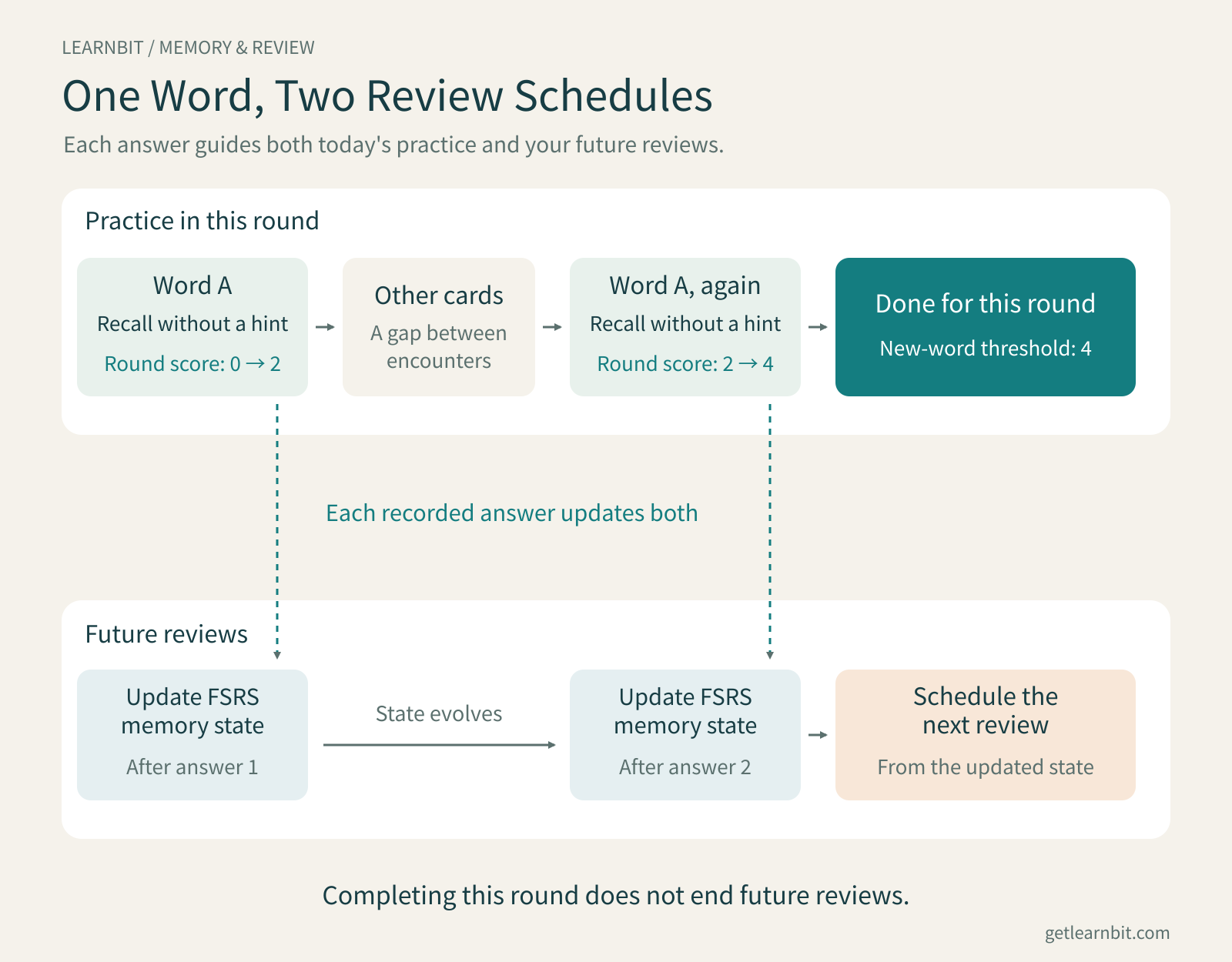
This gives new words room for practice within the current round while keeping future reviews tied to their estimated memory state.
Three kinds of recall get different responses
LearnBit distinguishes between three outcomes: recalling a word without a hint, recalling it with an example-sentence hint, and being unable to recall it.
Each changes the word’s score for the current round:
| Your response | Change to the round score |
|---|---|
| Recall without a hint | Add 2 points |
| Recall with an example-sentence hint | Add 1 point |
| Cannot recall and need to see the answer | Subtract 2 points, with a minimum score of −1 |
Both new words and review words start the round at 0. A new word finishes the round at 4 points or more; a review word finishes at 2 points or more.
For example, recalling a new word without a hint takes its score from 0 to 2. After some other card responses, it returns. Recall it without a hint again, and it reaches 4, completing the round.
If you cannot recall it the first time, its score drops to −1. It will need more successful recalls before it clears the threshold.
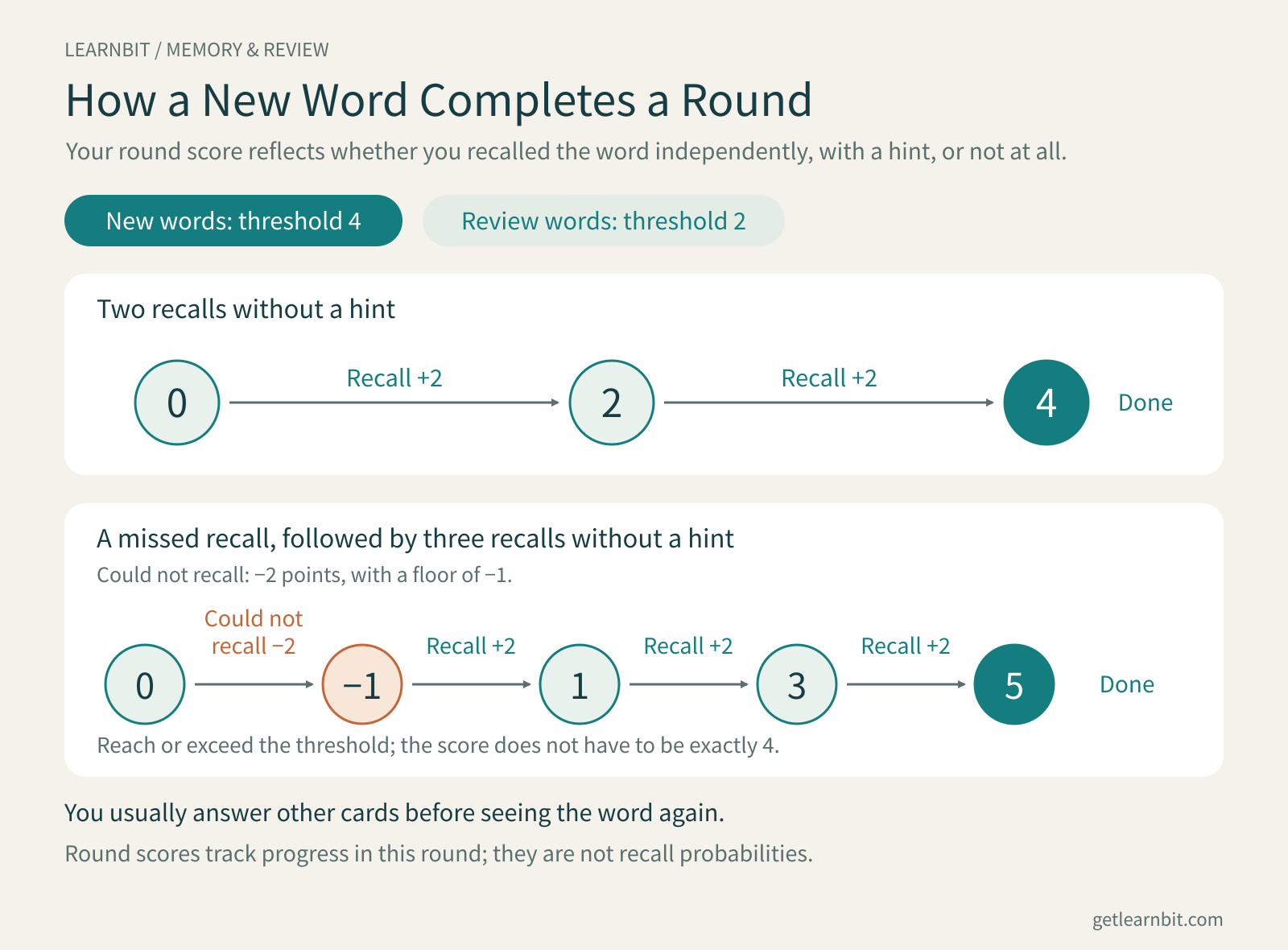
The design gives recall with a hint and independent recall different weight. Words whose answers you needed to see get more opportunities for practice. Words already in review can finish the round in fewer steps.
Words you miss come back later
If a word has not cleared the threshold, you can move on to other words. It stays in the queue and returns after further card responses.
The current target gaps depend on your answer: 2–9 subsequent card responses after a failed recall, 4–19 after recalling with a hint, and 6–37 after recalling without a hint if the word still needs more practice.
The app randomly chooses a position within the relevant range. Words that have not finished the round stay in the queue; it is their return position that varies. Once there are no unseen cards left in the round, the app continues with unfinished words rather than making you wait for the full gap.
This gives practice a varied rhythm. You move away from the answer you have just seen, work on other material, and then try to retrieve the word again. Words that need more practice generally return sooner.
You do not have to remember which word to revisit later or assign each one a review date. You can focus on the attempt in front of you while the app takes care of what comes next.
Recalling is part of learning
Why try to recall a word before looking at a hint or the answer?
Recognizing an answer when you see it is different from bringing it to mind without looking.
In a foreign-language vocabulary experiment published in 2008, Karpicke and Roediger found that, once a word had been recalled correctly, continued retrieval practice led to better recall a week later than simply continuing to study the word pairs.7
In LearnBit, each card likewise gives you a chance to recall independently before revealing hints and answers as needed. Words you cannot recall get more practice afterward.
If you cannot remember, say so. If you need the sentence hint, use it. Honest feedback helps the next steps reflect how that attempt actually went. Once the round is complete, future reviews continue to test and update the memory.
Keep the words you encounter in your learning routine
One practical thing a vocabulary app can do is close the gaps in a learning routine: words you look up but never save, words you save but never revisit, and reviews you have to keep reminding yourself to arrange.
Build your language skills through content you already enjoy. Learning English with YouTube or podcasts gives new expressions a voice, a scene, and a reason to remember them. There is less need to force isolated words into memory when you can connect them to something meaningful.
Pick a few words from your next video or podcast and save them in LearnBit. Use bilingual subtitles and word lookup to understand them, then return to them through dictation, speaking practice, and scheduled reviews. Give the expressions you meet today a place in what you say tomorrow.
References
Murre, J. M. J., & Dros, J. (2015). Replication and Analysis of Ebbinghaus’ Forgetting Curve. PLOS ONE. Paper
Wozniak, P. A. SuperMemo 2: Algorithm. Original description
Settles, B., & Meeder, B. (2016). A Trainable Spaced Repetition Model for Language Learning. ACL. Paper
Anki. Changes in 23.10. Official release notes
Open Spaced Repetition. The Algorithm. Official FSRS documentation
Anki. Deck Options — FSRS. Official documentation
Karpicke, J. D., & Roediger, H. L. III. (2008). The Critical Importance of Retrieval for Learning. Science. Paper
All illustrations are original LearnBit diagrams. Product behavior reflects the implementation as of November 2026.