
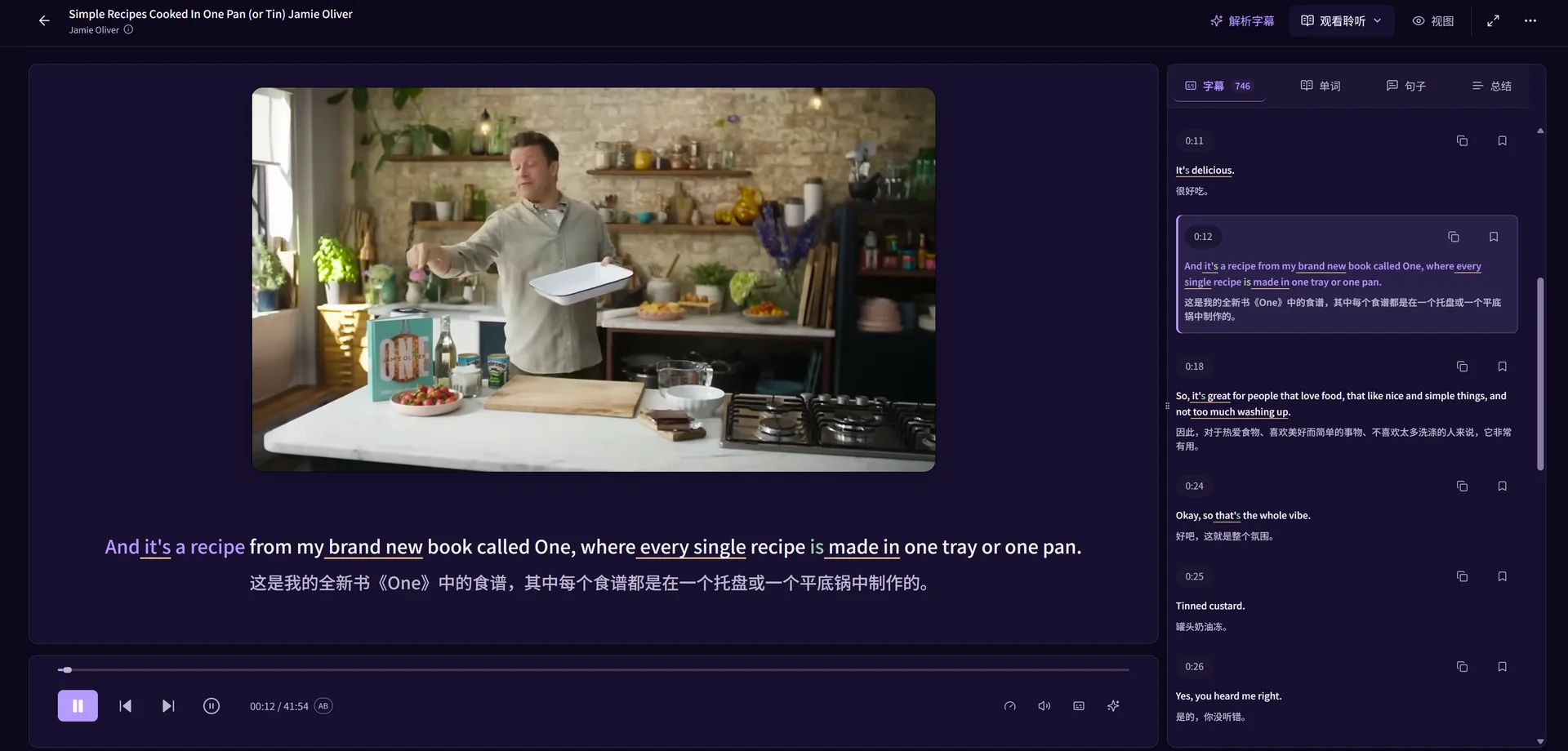
A video can make sense overall while one sentence still slips past. LearnBit brings available subtitles, playback and language tools together, so you can stay with that sentence without repeatedly searching through the whole video.
Start with a clip in your learning language. Understand the words in their original context, keep the expressions you want to use and continue with practice. The English examples on this page illustrate a workflow that also applies to other supported language pairs.
Choose something you want to understand
Find a YouTube video through the app's content discovery or add a supported video link. A short interview, an explanation of a familiar topic or a creator you enjoy gives you a reason to keep listening.
Confirm your learning and native languages in the app. Website English or Chinese only changes the website text; it does not choose your learning language pair.
Replay the sentence, rather than hunt for the timestamp
Use available subtitles to locate a sentence and replay it. Adjust playback speed or use a short AB loop when you need to hear a phrase again. First listen for the meaning, then return to a particular word or sound.
Captions are a useful reference, not a perfect record. When text and audio disagree, check the original audio instead of treating every caption as correct.
- Listen once without trying to understand every word.
- Pick one short passage and replay the unclear sentence.
- Check the text, then listen again without relying on the translation.
Look up words in the sentence where you found them
Open a word's meaning alongside the subtitles. Sentence analysis can help explain a structure, phrase or unfamiliar use without replacing the original context with a detached definition.
Choose a few useful words or phrases to save. Keep their source and your own notes, so a later review can reconnect the expression with the video where you met it.
Use the same material for listening and speaking practice
Once the sentence makes sense, try dictation or speaking practice where available. Dictation helps you notice which sounds you missed; recording a short sentence lets you compare your delivery with available source audio.
You do not need to turn every video into a lesson. Study a small part closely, then continue watching. Saved vocabulary can enter your review routine when you return.
What to check before starting
Subtitle availability, translation, AI analysis and pronunciation feedback depend on the video, your selected language pair and account access. A video link does not guarantee that a usable subtitle track exists.
LearnBit is a web learning application. This workflow does not require a LearnBit browser extension and does not imply support for Netflix or other streaming platforms. Open the app to sign in and select content; current allowances are explained on the pricing page.
Questions about this method
Can I learn languages other than English?
LearnBit separates learning language, native language and interface language. Choose your pair in the app and check the available tools. The English-learning examples do not mean every language has identical subtitle or speech capabilities.
Can I use every YouTube video?
Usable playback and captions depend on the original video and available processing options. Start with an accessible video and check its subtitles; unavailable or inaccurate captions can limit sentence practice.
What should I save from a video?
Save expressions you understood and expect to use, with the sentence and source attached. A small, relevant collection is easier to revisit than an unfiltered list of every unfamiliar word.