
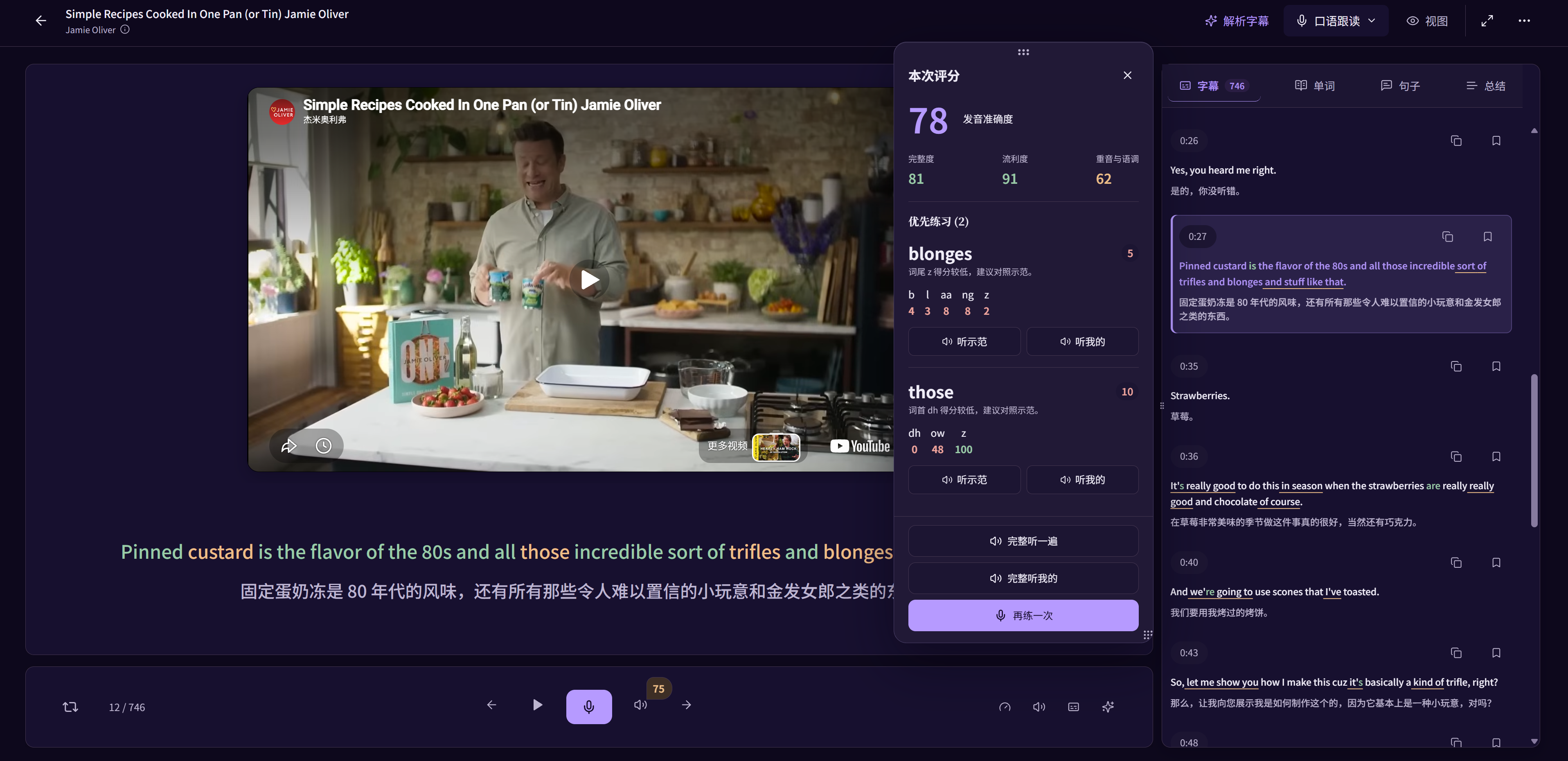
Understanding a sentence and saying it aloud are different tasks. LearnBit's speaking practice keeps the sentence, available reference audio and your recording close together, so you can listen to what happened instead of guessing from memory.
Continuous shadowing means speaking closely along with the audio. Pausing to listen, record and compare is a different practice format. You can use both in a learning routine; LearnBit's sentence practice is especially useful for the focused recording-and-comparison part.
Understand the sentence before copying it
Choose a short sentence from a video or podcast that you can already understand. Check any unfamiliar expression, then listen for how the speaker groups words, pauses and emphasizes the message.
Do not begin by trying to imitate a whole passage at speed. If the text is unclear, return to the source and meaning first.
Listen, pause and record one attempt
Use the supported speaking practice to record yourself saying the sentence. Listen again to available original or example speech and compare it with your take. This makes a concrete difference easier to hear than replaying the source alone.
A recording is one attempt, not a verdict on your language ability. Decide which word, ending or phrase you want to work on next, then record again.
- Listen to a complete short sentence.
- Pause and record it without racing the speaker.
- Compare one part of the source and your take.
- Repeat the sentence with that particular change in mind.
Use feedback to choose a practice target
In supported languages and account access, feedback can include word and phoneme details. Compare these indications with what you can hear, and use them to choose a small next task.
Scoring dimensions vary by language. A score is a practice aid, not an official exam grade, a guarantee of accent improvement or a reason to keep chasing a perfect number.
Return to the sentences you have practised
Review the sentences from a session and listen again after a break. Keeping the original sentence helps you practise an expression you might actually use, rather than disconnected sounds.
When the material feels manageable, you can try speaking along with the source outside the paused recording step. If you lose the meaning or rhythm, shorten the passage or return to listen-and-repeat.
Check language and microphone support
Recording requires a compatible browser and microphone permission inside the app. Source audio, reference speech and pronunciation assessment are not identical for every learning language or content item.
The website uses static product images. Open LearnBit to sign in and use speaking practice; check the pricing page for current access. This page does not run a microphone or submit a recording.
Questions about this method
Is listen-and-repeat the same as shadowing?
No. In continuous shadowing you speak along with the source with a small delay; in listen-and-repeat you pause before speaking. The guide explains how to choose and combine them.
Is pronunciation feedback identical in every language?
No. Supported dimensions and word or phoneme detail depend on the selected language, available provider capabilities and account access. Check the actual practice screen.
Should I always aim for the highest score?
Use the score and recording as clues. Focus on intelligibility and one audible difference, then try the whole sentence again. Automated feedback can be imperfect and is not a substitute for listening.