
If you learn English with YouTube videos or Netflix shows, you may know this problem: the dialogue makes sense with subtitles on, but familiar words become hard to catch when you turn them off.
Learners disagree about what helps. Some find themselves reading instead of listening. Others feel lost without subtitles. In forum discussions, one person says translations distract them, while another finds that a glance at the meaning frees them to listen more closely.1 2
Start with this question: Can you understand the sentence when you read it?
If the text is difficult too, check the vocabulary, phrases, or grammar. If it makes sense straight away, listen again and find the words you missed in speech.
Following the story and hearing the words
Subtitles in your own language help you follow a character's emotions, understand a joke, and keep track of the plot. The pictures and story help too. To check your listening, try identifying the English words the speaker used.
In a 2016 study, 60 university students watched 68 minutes of Downton Abbey with English subtitles, Spanish native-language subtitles, or no subtitles. The native-language group scored highest on plot comprehension; the English-subtitle group made the largest gains on a listening test. The test used dialogue from another episode with different characters, reducing the effect of remembering lines from the video.3
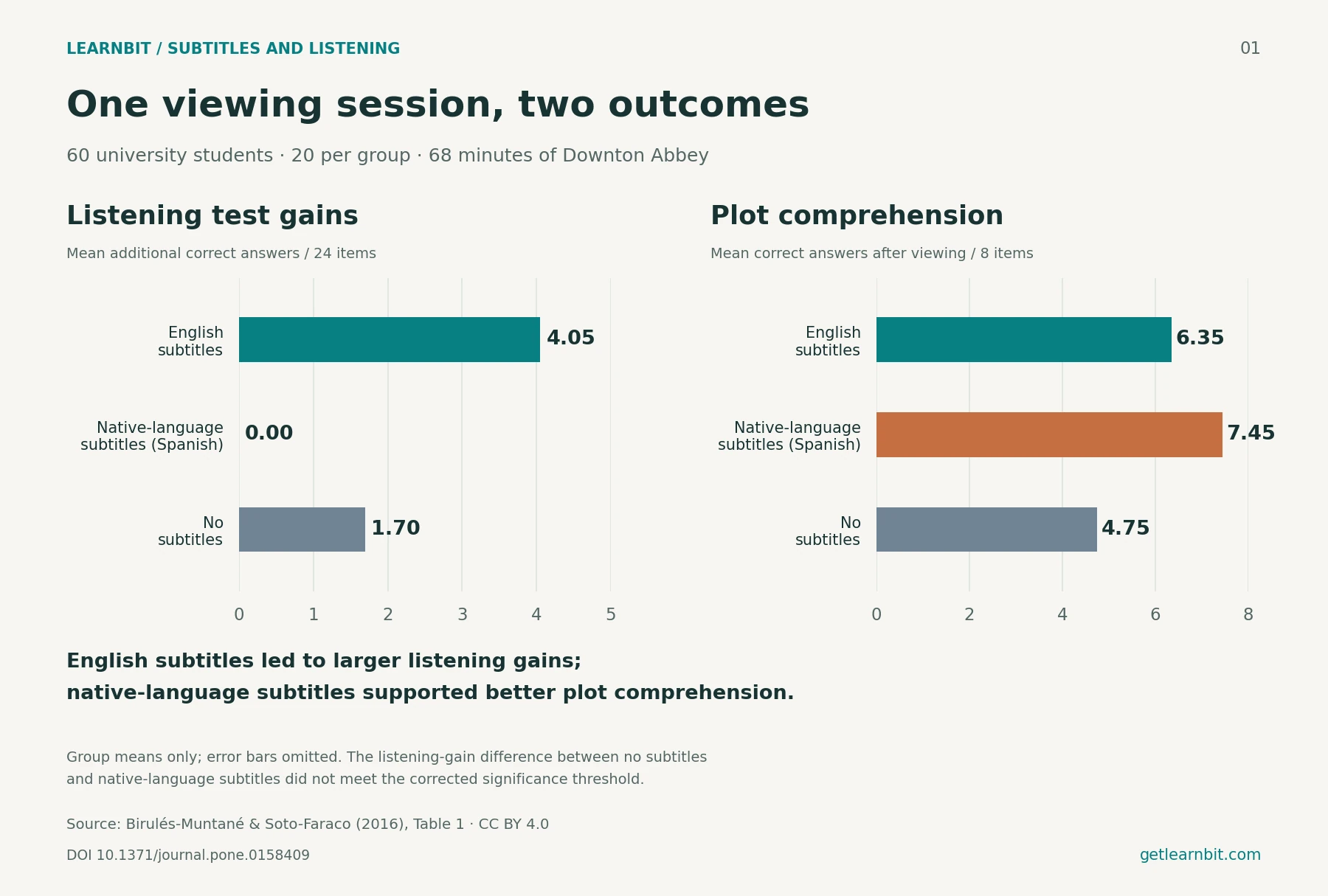
The study measured short-term changes after one viewing session. For everyday practice, it helps to treat following the story and hearing the words as separate goals for different viewings.
Let translation help you enjoy the story. When you find a line you want to learn, pause to check the English, then listen once without text. You can keep watching while making time for a little focused listening.
Why familiar words can be hard to hear
A difficult-sounding sentence may contain almost no new vocabulary. The spoken version simply sounds different from the words you recognize on the page.
In connected speech, some words are stressed, others are reduced, and sounds run together. You may know should, have, and told, yet miss them in a fluent "I should have told you earlier."
English subtitles let you check which words were spoken. On the next listen, you can focus on the sounds you missed.
In 2009, Mitterer and McQueen asked proficient Dutch learners of English to watch videos with unfamiliar English accents. Those who watched with English subtitles later did better at repeating audio excerpts they had not heard before. The results suggest that knowing which words were spoken can help learners adapt to how those words sound.4
A 2013 meta-analysis of 18 studies also found overall benefits from same-language subtitles for the comprehension and vocabulary outcomes measured.5
After checking a line, listen to the part that gave you trouble. Was a word reduced? Did two words run together? Did a familiar word sound different from what you expected? Reading the subtitle has now given you something specific to listen for.
How to use the four subtitle options
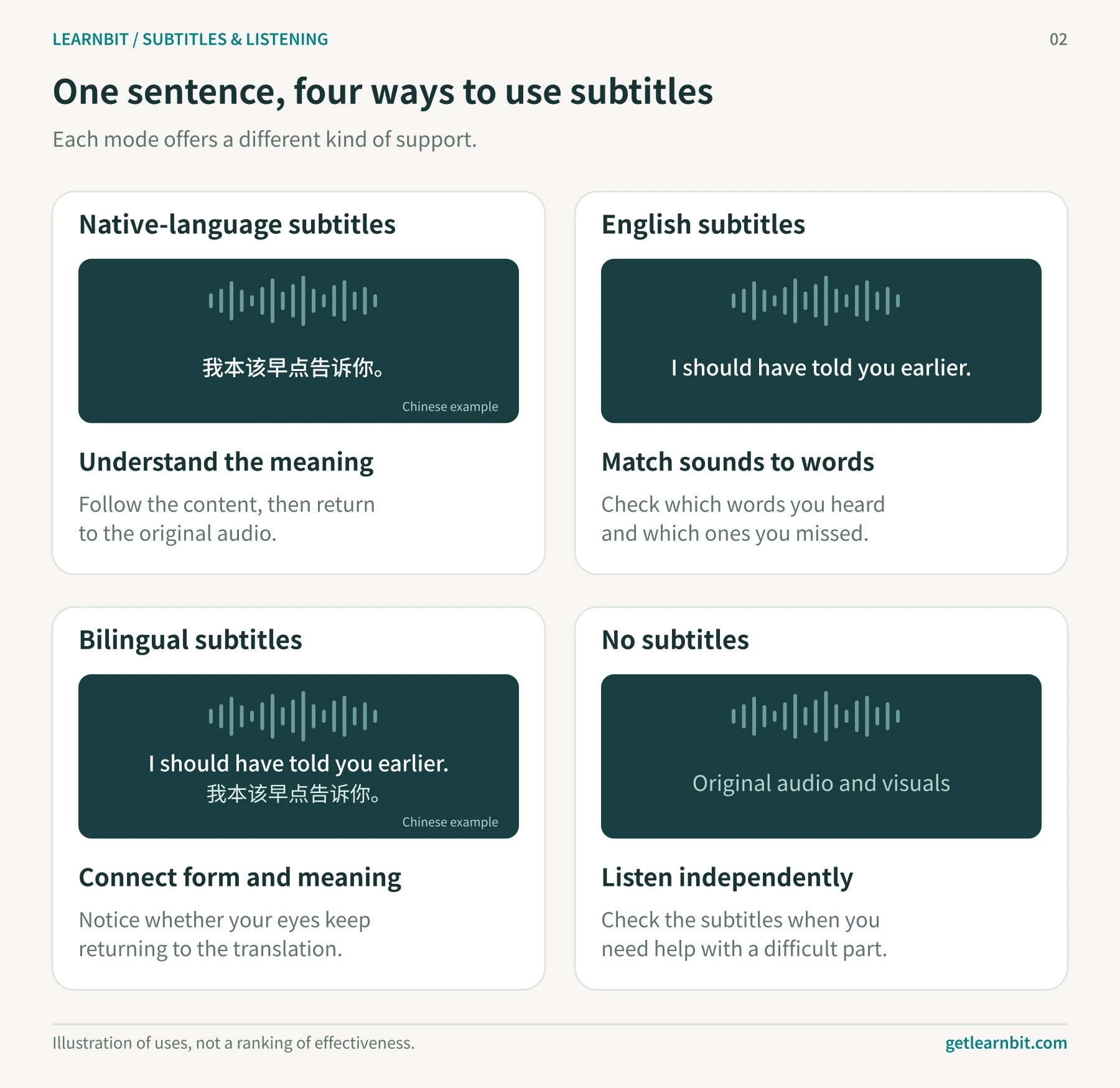
Native-language subtitles help you understand the content. Use them for unfamiliar topics, complicated background information, or a line that stops you following the plot. When an expression seems worth learning, check its English wording and pronunciation.
English subtitles help you check what was said, especially when you understand a sentence on the page but miss it in speech. Read it, then listen for those words in the recording. If almost every word needs a lookup, try easier material first.
Bilingual subtitles put the original wording and meaning together. They make checking convenient, but your eyes may stay on the translation. In 2022, Wang and Pellicer-Sánchez studied 112 intermediate-to-advanced Chinese learners of English watching a documentary, recording eye movements and testing vocabulary learning. The bilingual group paid more attention to the Chinese translation. They did better than the English-subtitle group at recognizing word meanings, but worse at recognizing word forms.6
Once you understand a line with bilingual subtitles, hide the translation and listen to the English again. You already know the meaning, so you can pay more attention to the wording.
Watching without subtitles lets you practice understanding speech independently. If you can follow the gist, keep listening and check key difficulties afterward. If several sentences leave you lost, turn the subtitles on to find out why, or choose an easier video.
Change the settings to suit the video. A talk about a familiar subject and a film with rapid dialogue make different demands on your listening.
Work out what you missed
Pause at the difficult line, look at the English text, and choose what to do next.
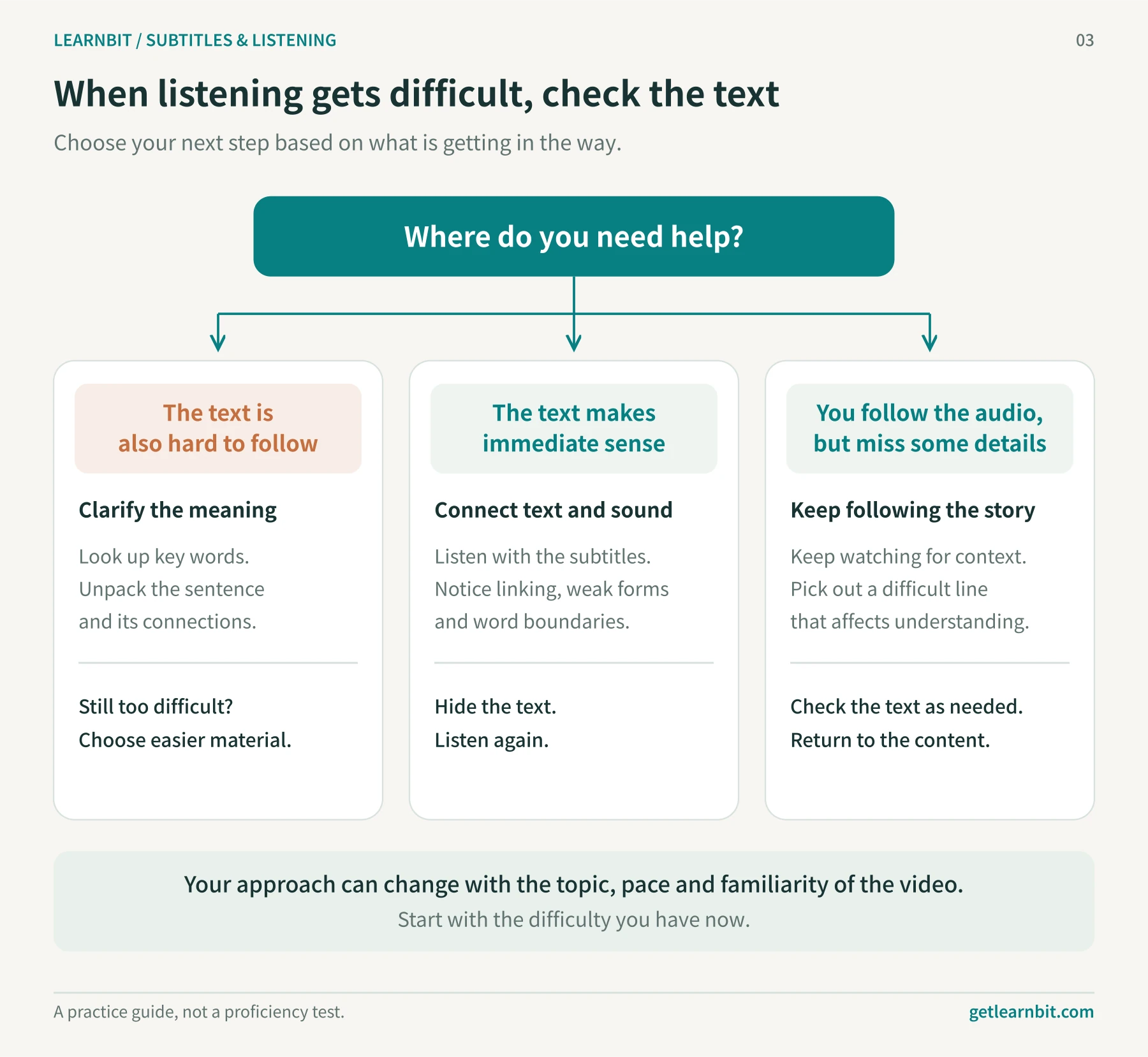
If the text is difficult too, work on meaning first. Look up the word that blocks understanding, or check a phrase's meaning in this scene. If you know the words, look at the main clause and how the other parts relate to it.
If the text makes immediate sense, focus on sound. Listen with subtitles to locate what you missed, then hide them and try again. Slow the audio if needed, and return to normal speed once you can hear the phrase.
If you miss only a few details, keep watching. Save your pauses for expressions that recur, seem useful, or remain confusing.
The subtitles can also be wrong. Automatic transcription is especially worth checking against the audio when names or background noise are involved.
Practice with one short clip
Looking up every line and repeatedly watching a whole episode can wear out your interest. Choose a clip of roughly 30 seconds to two minutes that you want to hear again, and watch the rest more continuously.
Listen once for who is speaking and what they are talking about. Note the part that most gets in the way of understanding. If the material is difficult, use translation to establish the background first.
Check the English subtitles for the words you missed. Look up a word or read the translation when needed. Once the meaning is clear, listen again for how those words are pronounced.
Then hide the text and explain the gist in your own words. How much of the difficult line can you hear this time?
For some dictation and speaking practice, write down what you hear, then say it aloud. Use LearnBit's speaking practice to record yourself and compare word endings, connected speech, or stress with the original. Once the line feels familiar, try shadowing: keep the recording playing and repeat what you hear with a short delay.
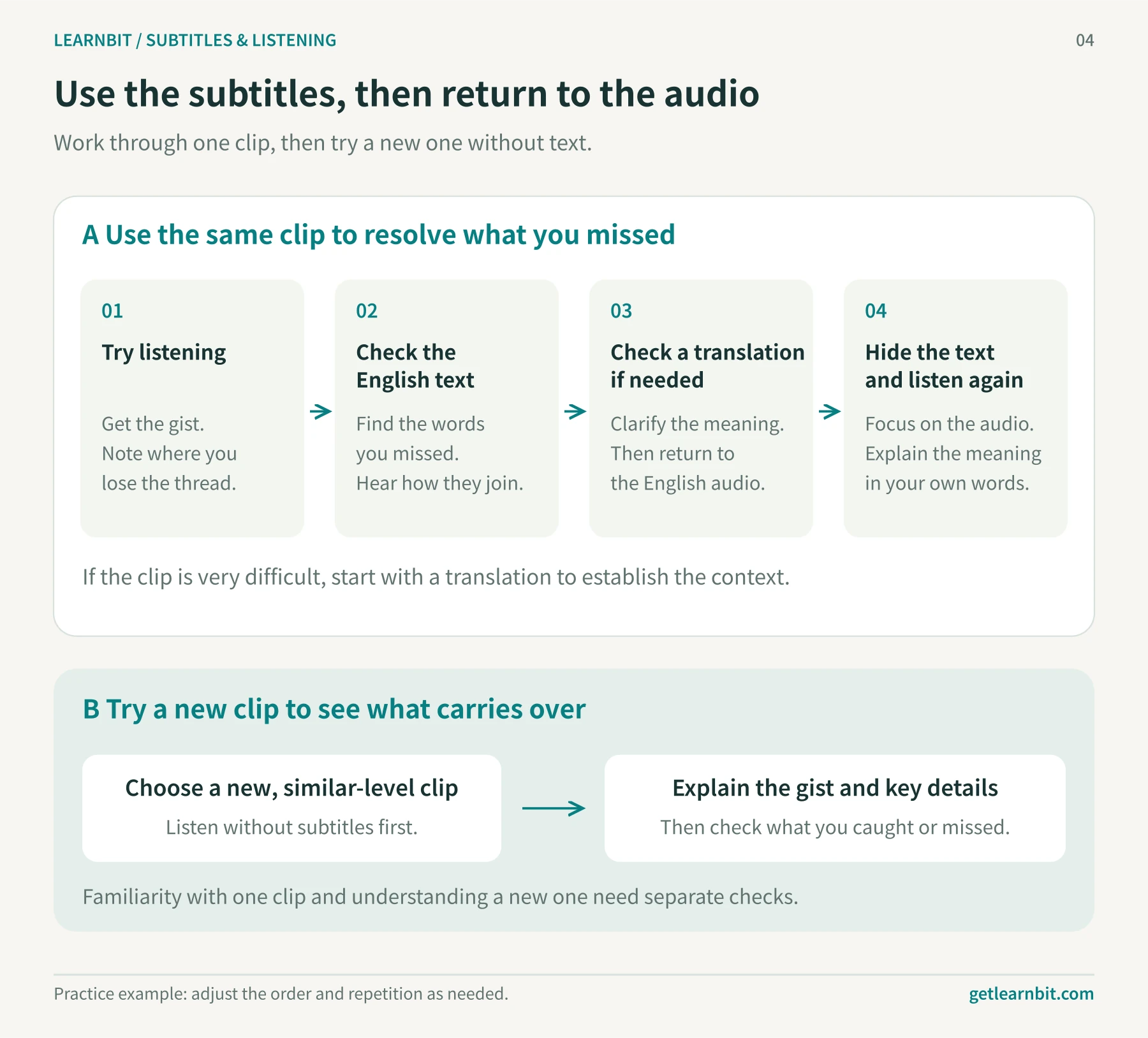
Repeated dialogue will become familiar. Next time, try a passage you have not seen before at a similar level. Without subtitles, describe its main point and a few key details. Notice which expressions you now recognize and which still need work.
Try it in LearnBit
Subtitle practice involves finding a line, looking up a word, checking a translation, and playing the sentence again. Keeping those actions together saves you from switching pages and losing your place.
LearnBit shows the video, current sentence, and bilingual subtitles in one learning view. While watching YouTube or listening to an English podcast, look up a word beside its sentence, then practice the expressions through dictation, recorded speaking, or vocabulary review.
LearnBit supports learning in 10 languages: English, Chinese, Japanese, Korean, French, German, Spanish, Italian, Brazilian Portuguese, and Russian. Choose your native language and the language you want to learn, then pick content that interests you.
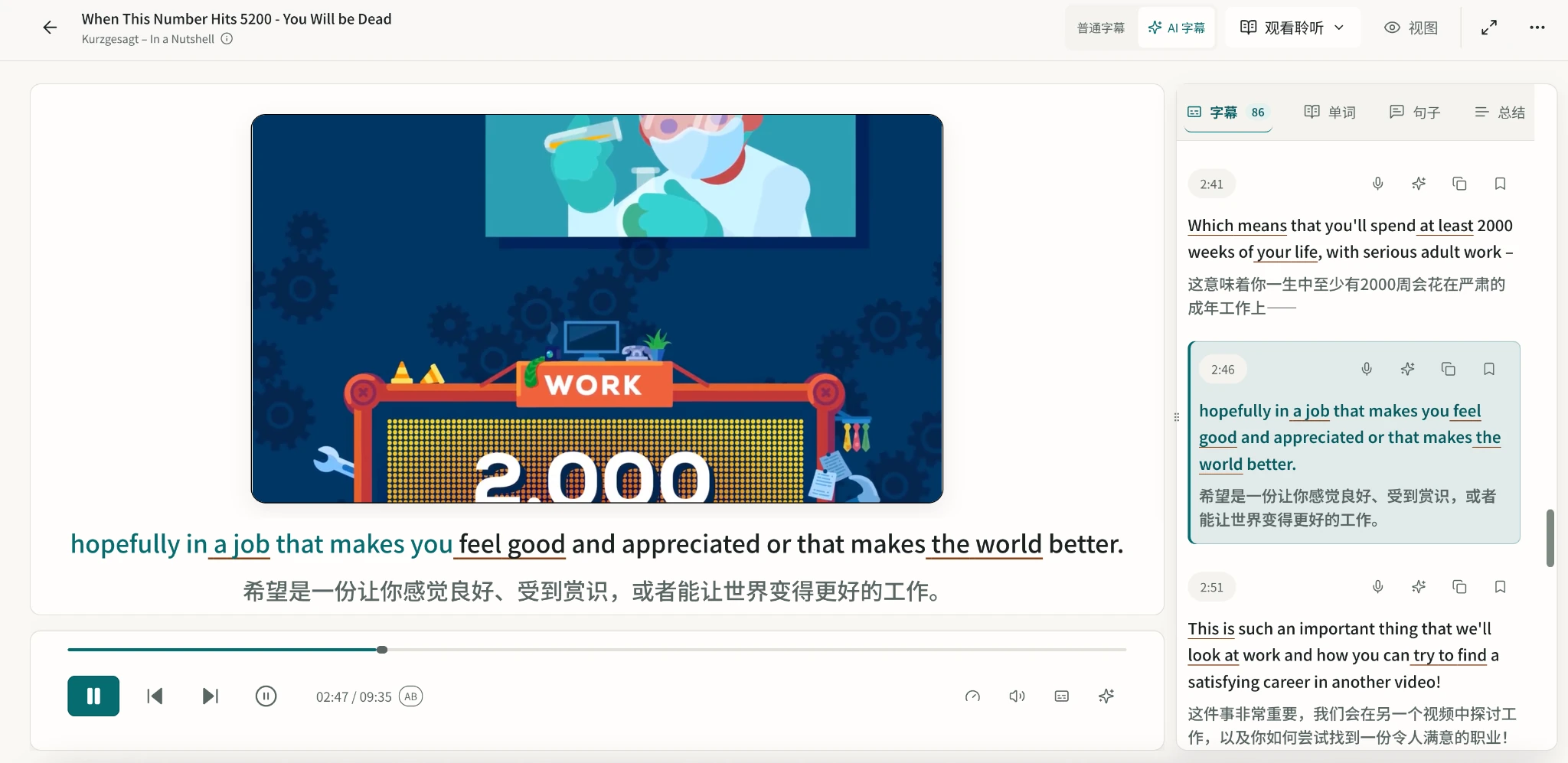
Read complete sentences and control the translation
Awkward subtitle breaks can make a sentence harder to follow. LearnBit uses natural language processing (NLP) to group fragmented subtitles into fuller sentences and reduce translation ambiguity caused by those breaks. Part-of-speech labels show how key words function, while vocabulary highlighting draws attention to words you are still learning.
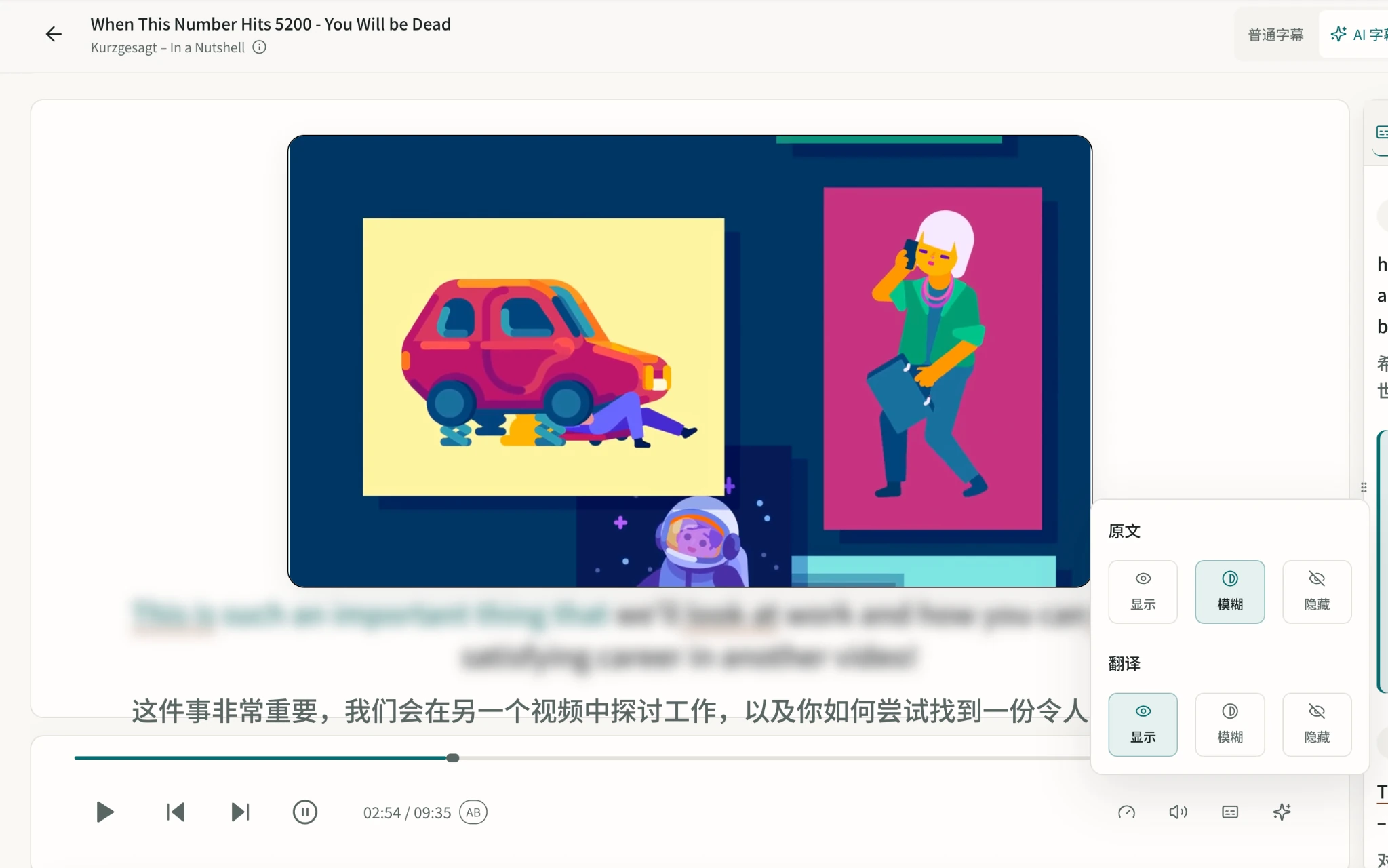
The original text and translation each have Show, Blur, and Hide settings. Hide the text to listen first, show the English to check the wording, and read the translation when you need the meaning.
You can also start with blurred text, try listening, and reveal the words when you get stuck.
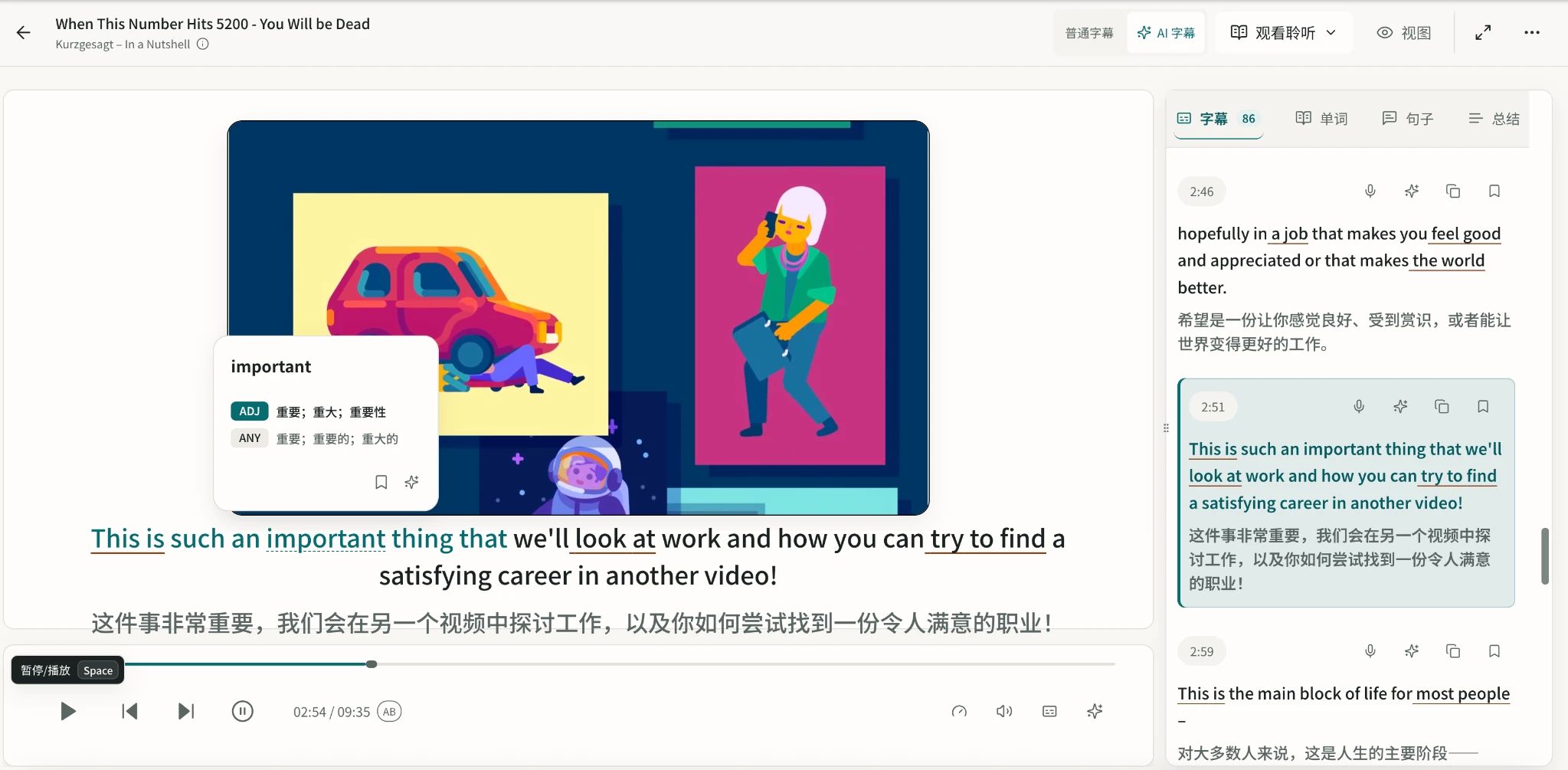
Look up words without losing the sentence
Click an unfamiliar word for a short definition. For a closer explanation, open AI word lookup, which uses OpenAI to explain the word's meaning and usage in the sentence. The video and dialogue stay in view so you can judge how the meaning fits the scene.
If you expect to use the word yourself, save it with the sentence. When you review it, you can remember where you first encountered it.
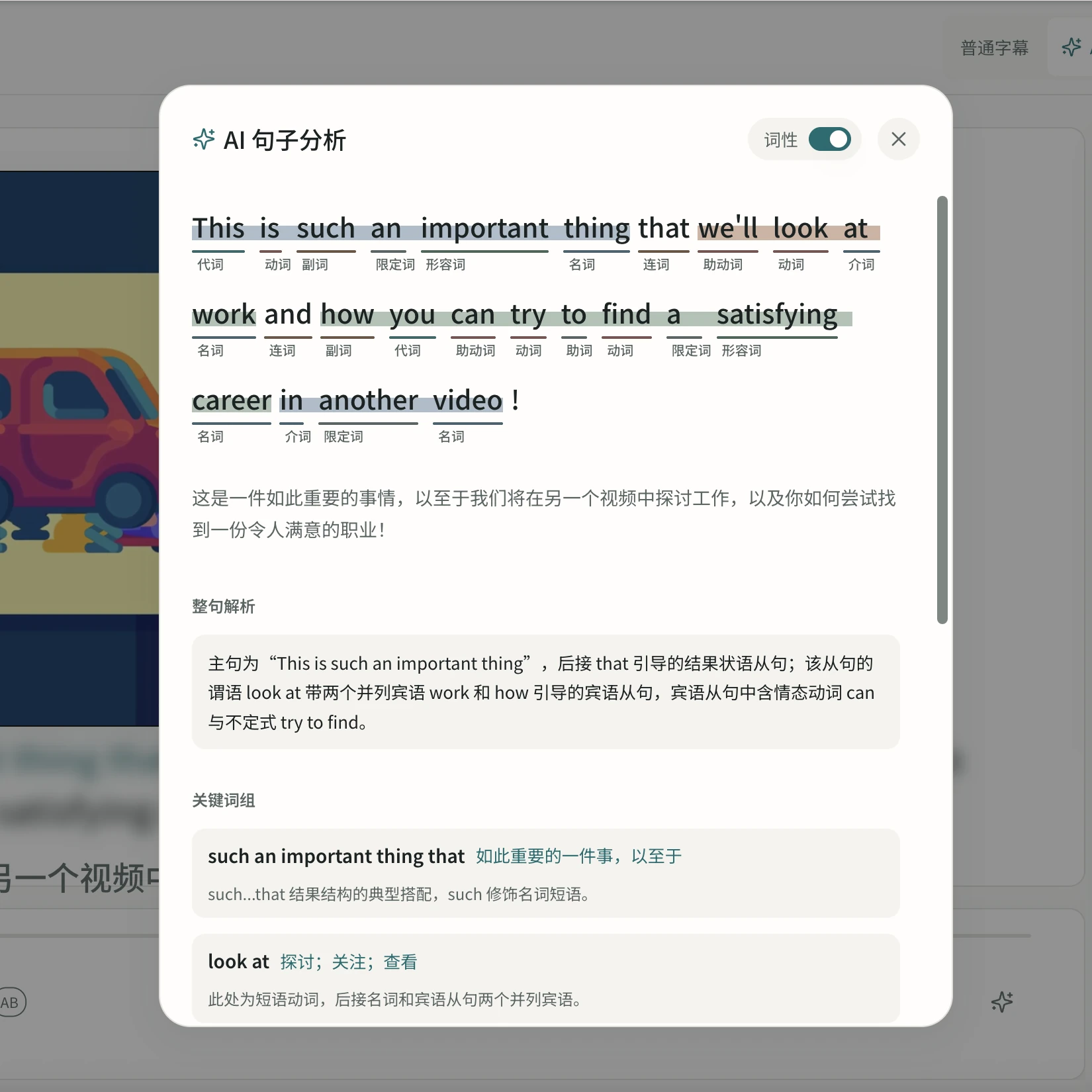
Work through a difficult sentence
When the words are familiar but the sentence is hard to follow, open AI grammar and sentence analysis. It explains the main clause, modifiers, and key phrases, along with the meaning of the whole sentence.
Listen again afterward. Notice where the speaker pauses and which words run together, and try matching the structure you can read with the rhythm you hear.
Start with one line you want to understand
Next time you open LearnBit, choose a line you missed. If you understand the English text, hide it and listen again. If you do not, check the vocabulary or grammar first.
Then try a new clip. Recognizing a similar expression without subtitles tells you more about what to practice next than memorizing one familiar line.
References
Reddit learner discussion: I finally can watch English content without subtitles. I'm so happy!.
Reddit learner discussion: How does watching shows in your target language help?.
Birulés-Muntané, J., & Soto-Faraco, S. (2016). Watching Subtitled Films Can Help Learning Foreign Languages. PLOS ONE, 11(6), e0158409. Full text.
Mitterer, H., & McQueen, J. M. (2009). Foreign Subtitles Help but Native-Language Subtitles Harm Foreign Speech Perception. PLOS ONE, 4(11), e7785. Full text.
Montero Perez, M., Van Den Noortgate, W., & Desmet, P. (2013). Captioned video for L2 listening and vocabulary learning: A meta-analysis. System, 41(3), 720–739. DOI; Author's institutional copy.
Wang, A., & Pellicer-Sánchez, A. (2022). Incidental Vocabulary Learning From Bilingual Subtitled Viewing: An Eye-Tracking Study. Language Learning, 72(3), 765–805. Full text.
Image credits
Figure 1 is redrawn from Table 1 in Birulés-Muntané and Soto-Faraco (2016), published under CC BY 4.0. Figures 2 to 4 are original learning illustrations created for this article. Figures 5 to 8 are LearnBit screenshots. The video images within them come from Kurzgesagt – In a Nutshell's When This Number Hits 5200 - You Will be Dead. They illustrate learning activities within the player; rights in the video imagery remain with its original creators.